jobsworth.
Three tradespeople reviewing plans and a phone together on site.

JOB MANAGEMENT SOFTWARE FOR UK TRADES

Built for the Trades

Jobsworth helps trade businesses protect their margins by keeping every job, change and approval connected from enquiry to payment.

Get Early Access
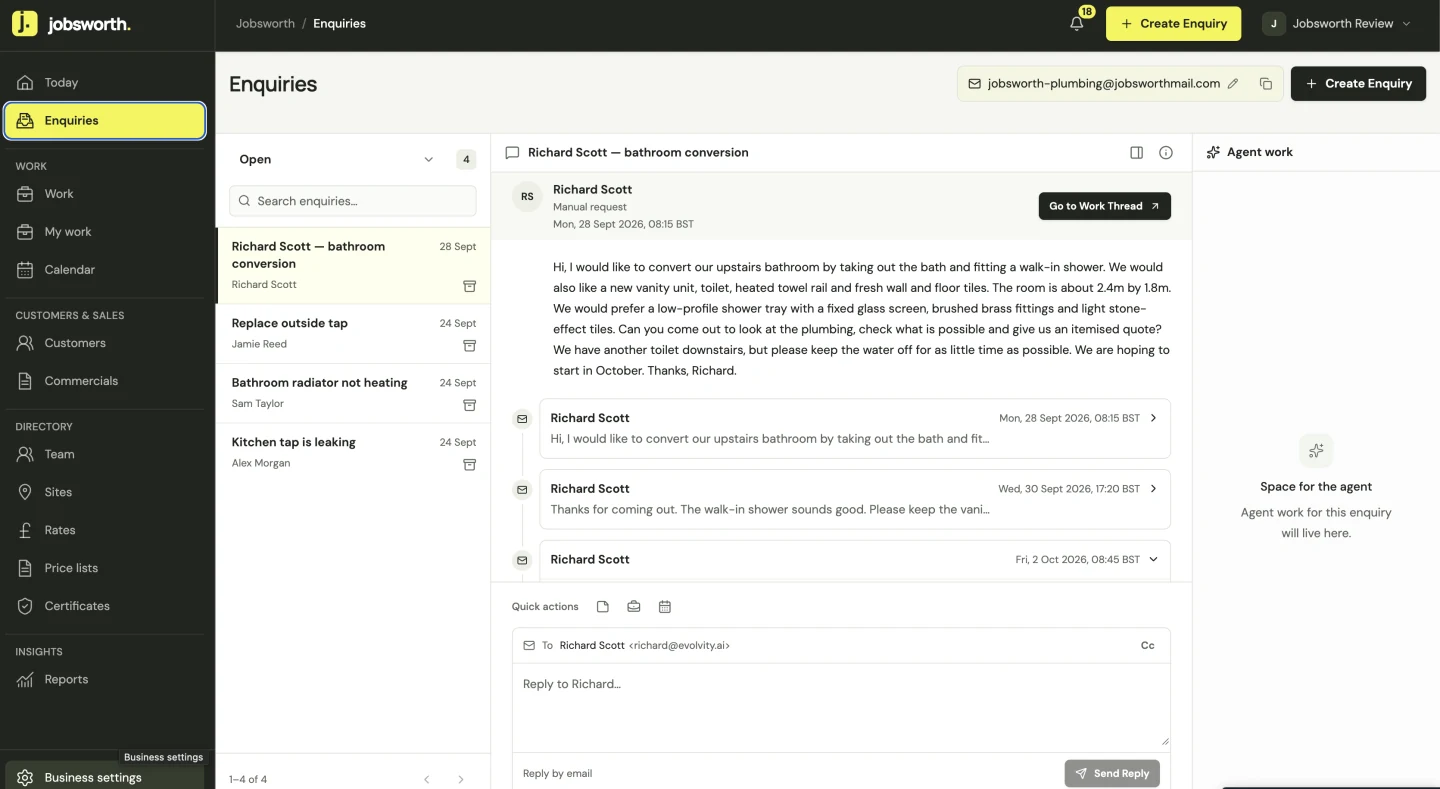
Jobsworth Enquiries showing a bathroom conversion enquiry and its customer conversation.
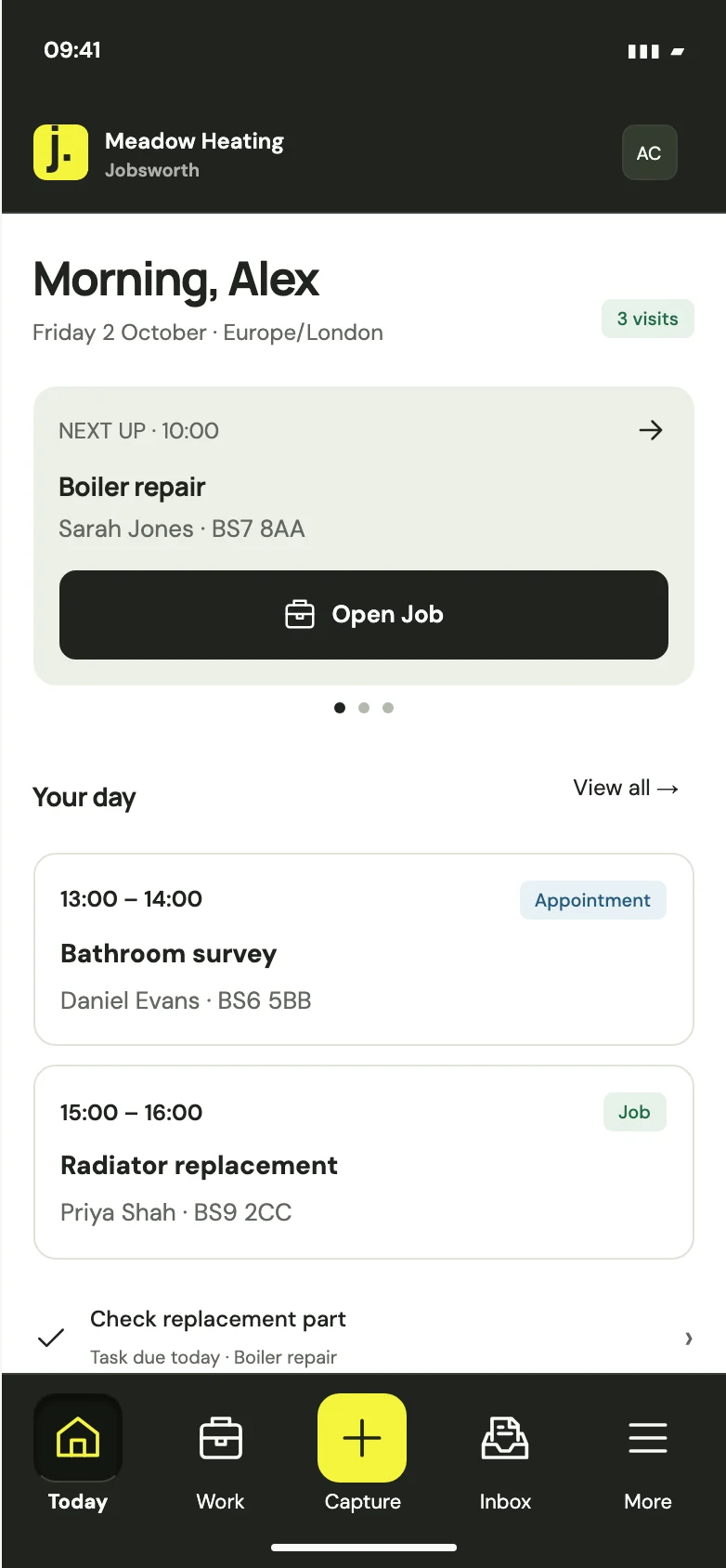
Jobsworth on iPhone, showing the Today screen with upcoming visits and tasks.

BUILT FOR PROJECT WORK

For small trade teams
running project work.

Jobsworth excels when you’ve got several jobs on the go, each lasting days or weeks. Keep track of what you quoted, what’s changed and who needs to be where.

MEET THE WORK THREAD

Everything for the job, kept together.

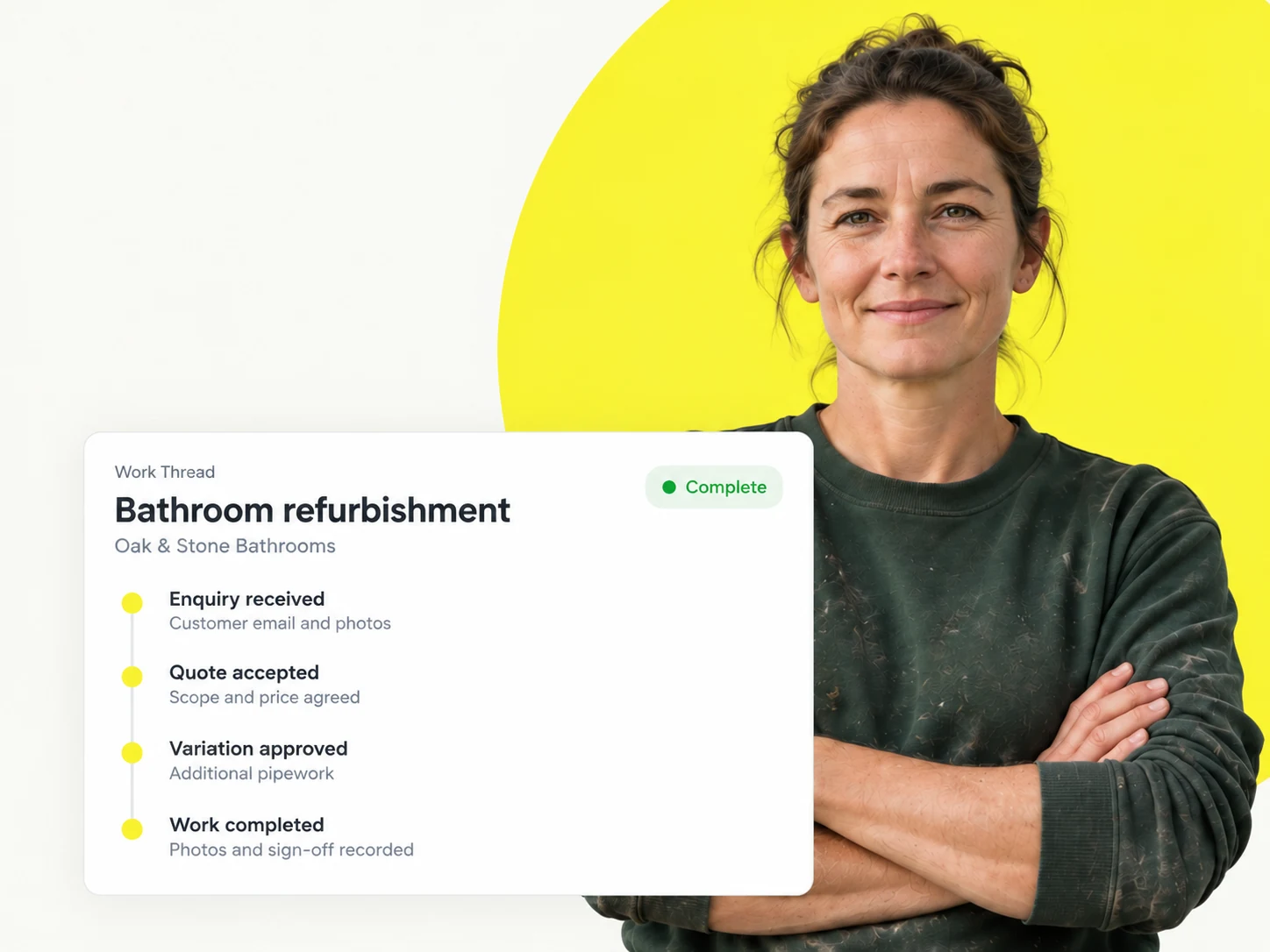
A bathroom refit can mean a site visit, a quote, a few days on the tools and an invoice at the end. Jobsworth keeps all of it in one work thread, alongside the customer’s details, photos and notes. When they ring, or someone else picks up the work, the whole story is there.

A tradesperson with an illustrative bathroom refurbishment work thread, linking the enquiry, accepted quote, approved variation and completed work.

KEEP TRACK OF VARIATIONS

Get the extras agreed before you do them.

See what you’ve agreed to charge, what labour and materials have cost, and what’s left to invoice. Find overdue payments and jobs waiting on you.

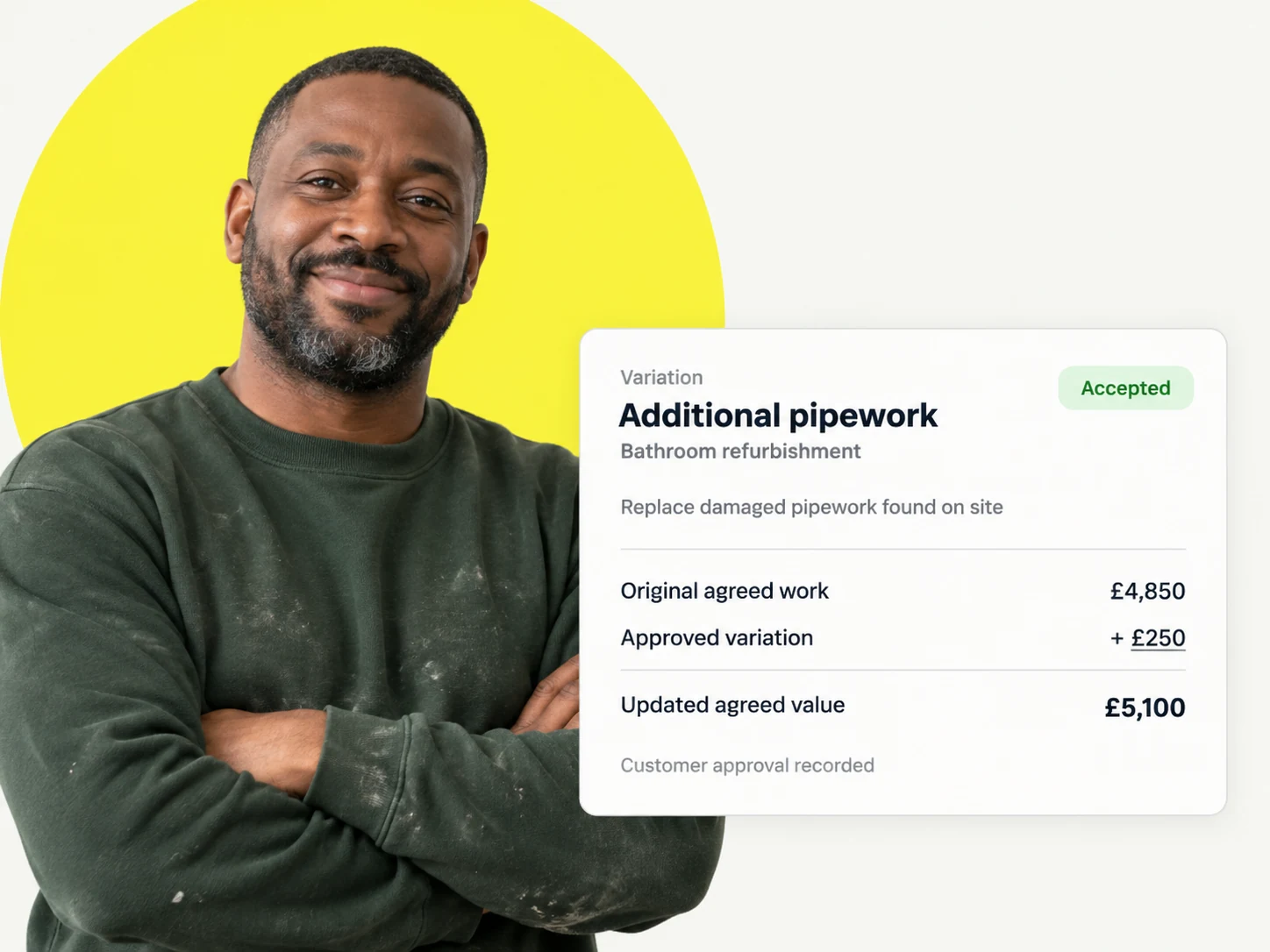
Record changes against the job, add photos and notes, and send the customer a priced variation to approve. Each version keeps its own scope, price and response history.

A tradesperson beside an illustrative accepted variation for additional pipework, showing the original agreement, approved extra and updated value.

ADVANCED BUSINESS REPORTING

Know which jobs are paying their way.

Start with 31 ready-made reports covering 12 parts of your business, including Jobs, Invoices, Variations, time entries and Subcontracts, without the need for separate BI software.

Build your own reports, group the figures and open the work behind them. Save a report for yourself or share it with your team.

A trade business owner beside an illustrative job profitability report comparing revenue, direct costs and gross profit across three jobs.

THE DAY-TO-DAY

Everything you’d expect to run your business.

Enquiries, quotes, the diary, invoices and the everyday paperwork. All kept alongside the work you’re doing.

Quote and book

Enquiries

Keep new requests in one place, with the customer’s details and a reminder of what you need to do next.

Quote and book

Customers

Keep their contact details and past jobs to hand. Set a reminder when their next service is due.

Quote and book

Time & estimating

Work out the labour and materials before you give a price. Keep what it costs you separate from what you charge, then check it against the finished job.

Quote and book

Quotes & follow-up

Send the quote, see who’s said yes and keep track of the ones you need to chase. Book the work when you’ve agreed it with the customer.

Plan the work

Site management

Keep the address, access instructions and site contact with the work. Give each person access to the sites they need.

Plan the work

Work threads

Keep the quote, visits, notes and invoices for each piece of work together. Pick up where you left off when the customer rings.

Plan the work

Today & tasks

See what needs sorting today and who’s doing it. Set dates and checklists for the jobs to do, quotes to chase and customers to ring.

Plan the work

On-site work & handover

Check the job details on your phone before you set off. Add photos, notes and materials while you’re there, ready for whoever comes next.

Plan the work

Scheduling & jobs

Put jobs and visits in the diary, choose who’s going and keep the address and instructions with the booking.

Get paid

Invoices & receipts

Put the work you’ve done onto an itemised invoice, with the right VAT details. Send it to the customer and record payments as they come in.

Get paid

Invoice reminders

Let reminders chase what’s still owed. Choose when they go out, pause them if you’ve agreed a payment date and stop them when the invoice is paid.

Get paid

Payment tracking

Record deposits and payments as they come in. See who owes you, how much is left and what each customer has already paid.

Get paid

Costs & reporting

Put the agreed job price next to your labour, materials and other direct costs. See the margin, check which enquiries became jobs and spot where money is being made.

Straightforward pricing.

Choose the tools you need and pay for the people who use them.

14-day free trial

No yearly lock-in. We have to earn your business each month.

Core

Keep enquiries moving and agreed work organised.Capture enquiries, follow up on quotes and book the work. Keep customer details, tasks and job records together, then issue invoices and record payments.

£29per user / month
Get Early Access on Core

Your everyday essentials

Pro

Spend less time chasing. See how job costs compare.Everything in Core, with automatic quote and invoice email reminders, time and materials capture, and estimates compared with actual direct costs.

£39per user / month
Get Early Access on Pro

Everything in Core, plus

Plus

Keep changing work
tied to clear agreements.
Everything in Pro, with customer-approved variations, fixed-price subcontract review, advanced reporting, and records for drawing revisions and certificates.

£49per user / month
Get Early Access on Plus

Everything in Pro, plus

Card required. Your chosen plan bills monthly when the trial ends unless you cancel. Prices exclude any applicable VAT.

Compare all plan features

GOOD TO KNOW

Frequently asked questions.

Is Jobsworth right for my business?

Jobsworth suits small trade teams with several jobs on the go, work lasting days or weeks, and people to coordinate. It is built around quoted project work: keep the agreed scope, changes, drawings, subcontracted work, costs and invoices together. Refurbishment builders, kitchen and bathroom installers, landscaping contractors, roofers and installation teams are a particularly good fit.

How much does it cost, and which plan do I need?

Core is £29, Pro is £39 and Plus is £49 per login per month. Core covers everyday work, quoting, scheduling and invoicing. Pro adds estimating, job costs, time and materials, and automatic chasing. Plus adds Variations, Subcontracts, Drawing Review and custom reporting. Everyone in your business uses the same plan; people listed in your Directory without a login do not need a paid licence.

Is there a lock-in contract?

No. You can cancel renewal at any time in Plan & billing. Your access continues until the end of your current paid or trial period, and your subscription will not renew after that. You get 14 days free on the plan and login count you choose at setup, with a card required. We show your subscription amount and first payment date before you start.

Can my team use it on their phones?

Yes. Jobsworth is available on iOS and Android, so your team can see assigned jobs, appointments, customer details and site instructions while they’re on the tools. Add photos, notes and materials, record time and leave a handover for the next person. Each person gets the access allowed by your plan and their permissions. An internet connection is required.

Can I bring my existing customers and price lists?

Yes. You can upload customer details from a CSV file and review them before importing. Supplier price lists can also be imported with the relevant plan and permissions. Check the supported columns and review duplicates before confirming. Moving an entire job history or every attachment from another system is a separate requirement to discuss with us.

Does it connect to my accounting software?

Accounting connections are coming soon. Jobsworth does not currently sync automatically with Xero, QuickBooks or Sage. You can use it to manage the work, prepare invoices and record money received while keeping your accounting software separate. If accounting sync is essential to your business, check its availability with us before switching.

Can I give subcontractors access to their work?

Yes. Plus includes subcontractor agreements, selected work packs, offer acceptance, delivery evidence and review. Choose the work and Sites each person can access without sharing the whole business or private job costs. A subcontractor can be listed in your Directory without a paid login; signing in to Jobsworth requires a paid licence.

What help can I get with setting up?

Our help guides cover getting started, bringing in your records and using the main workflows. You can also get in touch through our Contact page to discuss your setup or whether Jobsworth fits your business. Tell us the kind of work you do, who needs access and which records or existing tools you need to bring across.

Can I change plans or cancel?

Yes. The Business Owner can manage the plan, paid logins and cancellation in Plan & billing. Review the charge, renewal amount and effective date before confirming a change. Cancelling stops the next renewal; access continues until the end of the current paid or trial period. Removing someone’s access from a paid subscription leaves a reusable licence rather than automatically reducing your bill.

What happens to my records if I stop using Jobsworth?

Your work records stay available to view for 90 days after your paid or trial access ends, giving you time to collect the information you need or arrange a move to another system. The usual team and Site permissions still apply, and new work and paid feature actions stop. Contact us within those 90 days if you need help getting your records.